

👋🏼 Hello there!
If you are a product designer like me, you have probably picked up many software engineering concepts by osmosis over time—but you may not have fully confirmed that you understand the full picture, or you may not know how to explain the terms if someone asked.
However, with rising expectations to ship code with AI and debug things constantly, it helps to have a starting point, a solid foundation, and a high-level mental map to anchor your sanity.
So I put together this illustrated guidebook (with the help of NotebookLM and Notion AI) for semi-technical, non-technical, and technical-adjacent members of software teams—not just to provide a glossary, but to show how each piece connects to the next, with examples of how to use the terms in a sentence.
Pro tip: Feel free to feed it into NotebookLM or any AI chatbot of your choice, and ask it to quiz you and answer your questions verbally. (Not multiple-choice quizzes!) Active learning, folks—I promise you will feel much better about life afterward.
🧠 The story in one sentence
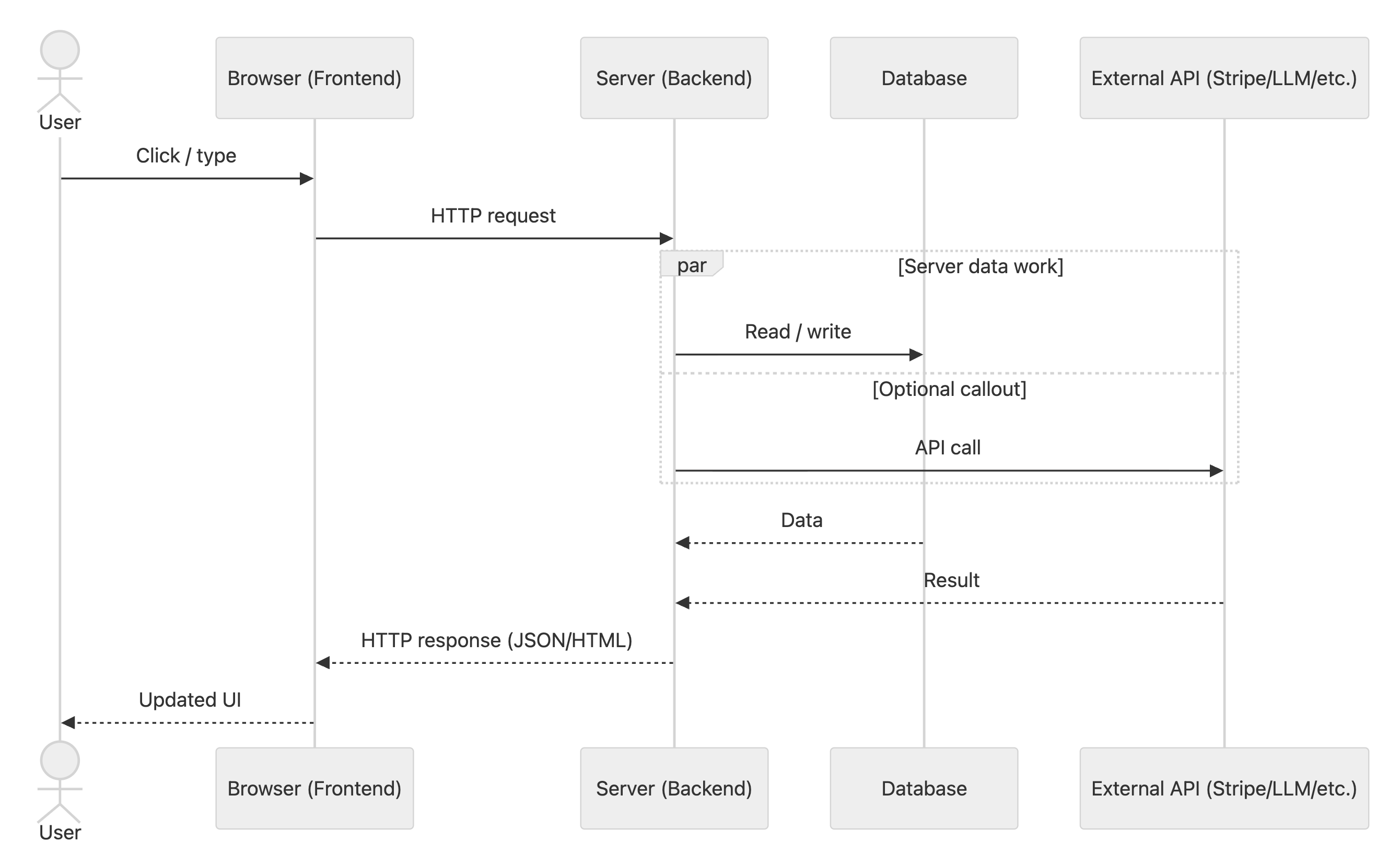
When a user interacts with the UI, the frontend sends a request, the backend applies rules and talks to the database and other services, it returns a response, and the UI updates.
🗺️ The map
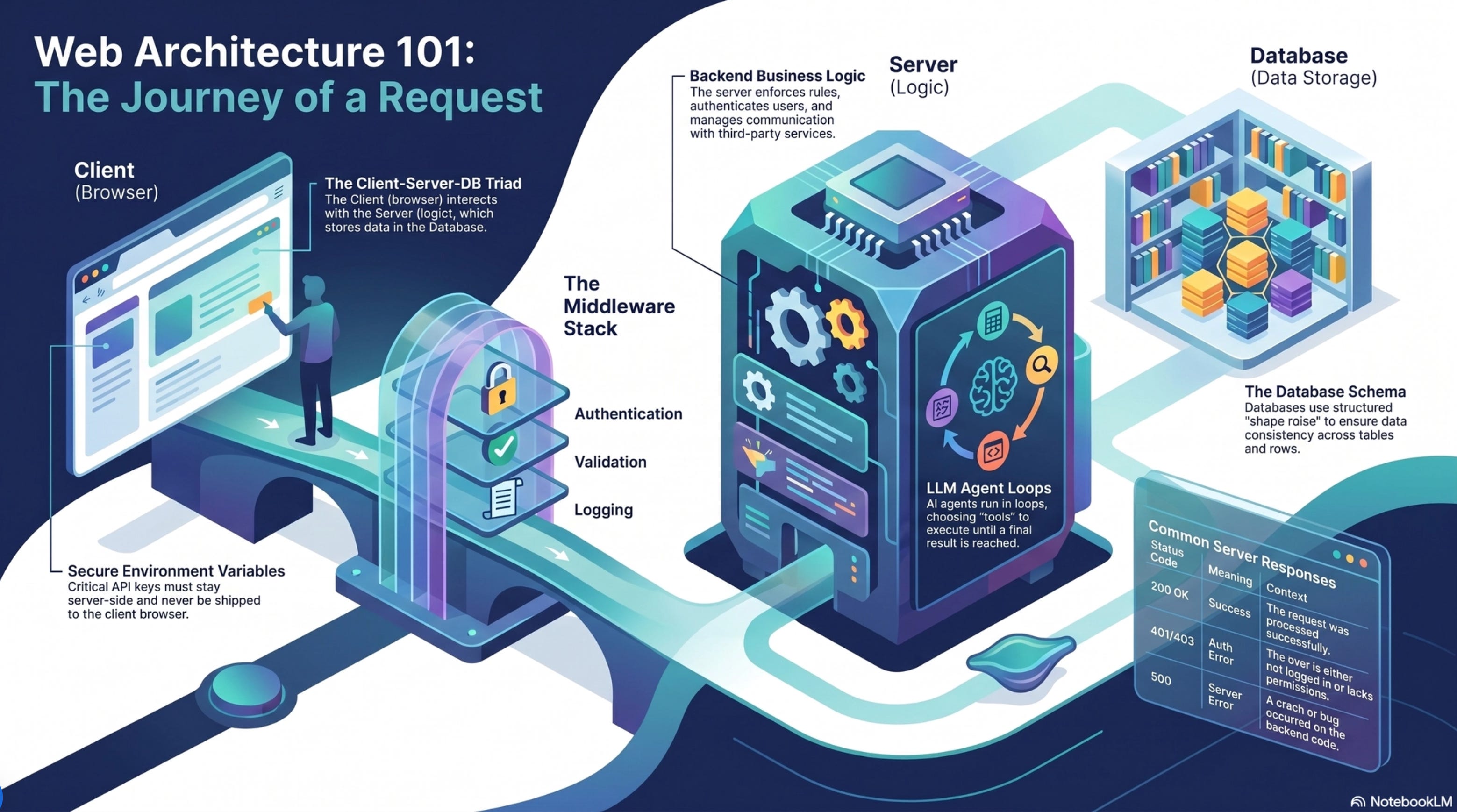
Frontend (client): the UI in the browser
Backend (server): the “kitchen” that enforces rules + coordinates work
Database: durable memory (what you don’t want to lose)
External APIs: services you rent (Stripe, LLMs, email)
🧩 Core pieces
🖥️ Frontend (client)
Plain English: “the screens.”
The frontend is what the user sees and interacts with.
It renders the interface (pages, components).
It collects input (clicks, typing).
It calls the backend when it needs data or wants to change something.
Concrete example: You click “Enroll” on a course page. The React component updates the button to a loading state and sends a POST /api/enroll request.
Designer translation: layout + interaction + state. The frontend is responsible for what the user perceives.
🧑🍳 Backend (server)
Plain English: “the rules + orchestration layer.”
The backend is code running on a server you control.
It decides what’s allowed (permissions)
It validates inputs (“is this form submission valid?”)
It reads/writes the database
It calls external services (payments, email, LLMs)
Concrete example: The server receives POST /api/enroll, checks you’re logged in, verifies the course is open, writes an enrollments row, then returns { success: true }.
Designer translation: the backend protects product integrity (trust, safety, billing, data correctness).
🗃️ Database
Plain English: “your product’s long-term memory.”
The database stores durable product data: users, courses, progress, purchases.
It’s optimized for structured data and queries.
It is usually not where you store big files (images/videos). You store files in file storage and save a file reference in the DB.
Concrete example: There’s a users table with a row for you, and an enrollments table that links your user ID to the course ID you enrolled in.
Designer translation: database structure strongly shapes what features are “easy” vs “painful.”
🔌 External API
Plain English: “a service you call over the internet.”
When your server calls Stripe or an LLM provider, it’s using an external API.
You send them a request.
They send you a response.
Concrete example: Your backend calls Stripe’s API to create a checkout session, then redirects the frontend to Stripe’s hosted payment page.
Designer translation: external APIs are leverage, but they add dependency risk (latency, downtime, cost).
🌐 Networking & web APIs (request/response)
↔️ Request vs response
These are the two halves of a network round-trip.
Request = what you ask for (method + URL + inputs)
Response = what you get back (status code + data)
Concrete example: Request: GET /api/courses?topic=ux → Response: 200 plus JSON like [{ id: 12, title: "UX Research" }, ...].
Debug mental model: “What did we send?” + “What came back?”
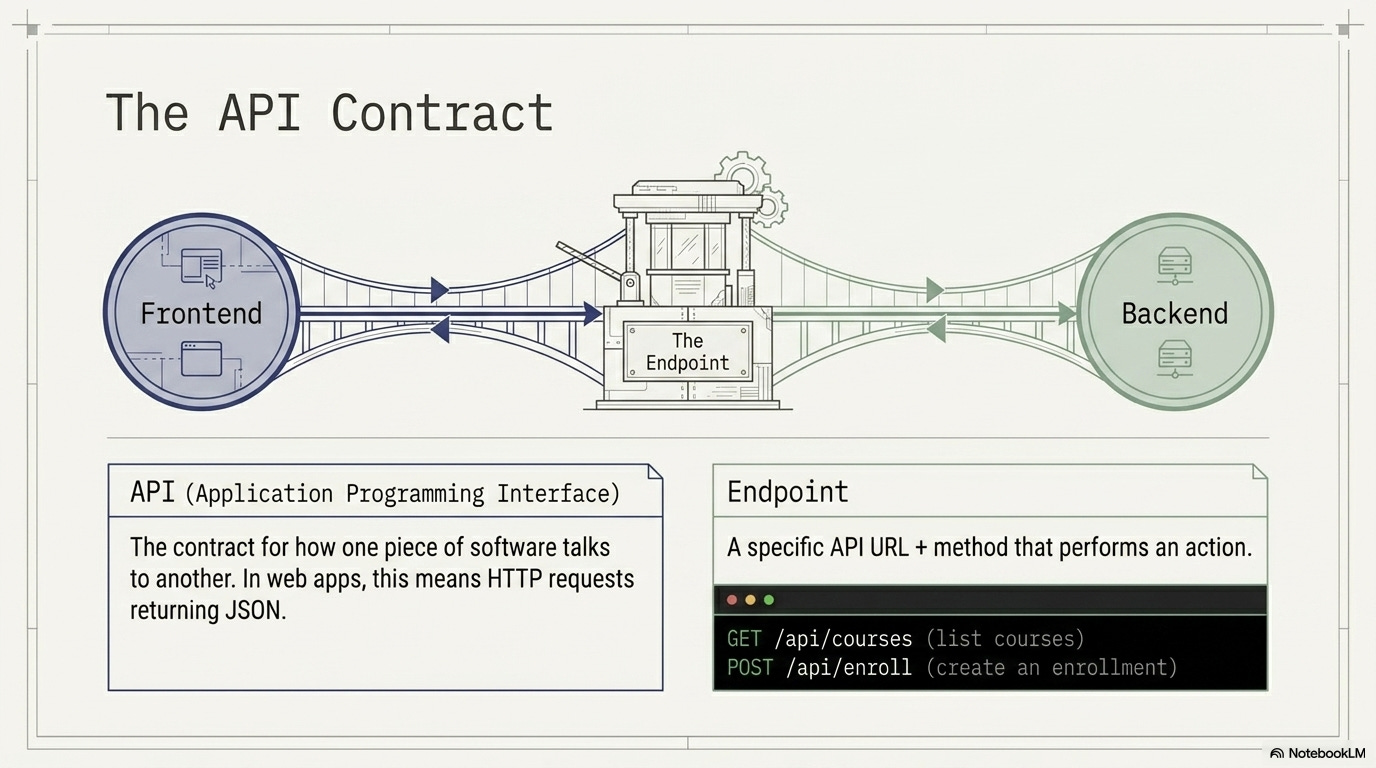
📜 API (Application Programming Interface)
Plain English: “the contract.”
An API is a defined way for two pieces of software to talk. In web apps, this usually means HTTP requests returning JSON.
API defines inputs (what you can send)
and outputs (what you’ll get back)
Concrete example: The “Enroll API” says the frontend must send { courseId }, and the backend will reply with either 200 { enrollmentId } or 400 { error }.
Designer translation: An API is a menu of actions the frontend can ask the backend to do, with strict input/output rules.
🎯 Endpoint
Plain English: “one specific action on the contract.”
An endpoint is a specific URL + HTTP method that performs a job.
GET /api/courses→ “give me courses”POST /api/enroll→ “create an enrollment”
Concrete example: PATCH /api/profile updates a user’s bio; it’s a single endpoint with a clear job.
Designer translation: endpoints map closely to user intents (view list, create, update, delete).
🔤 HTTP methods (verbs)
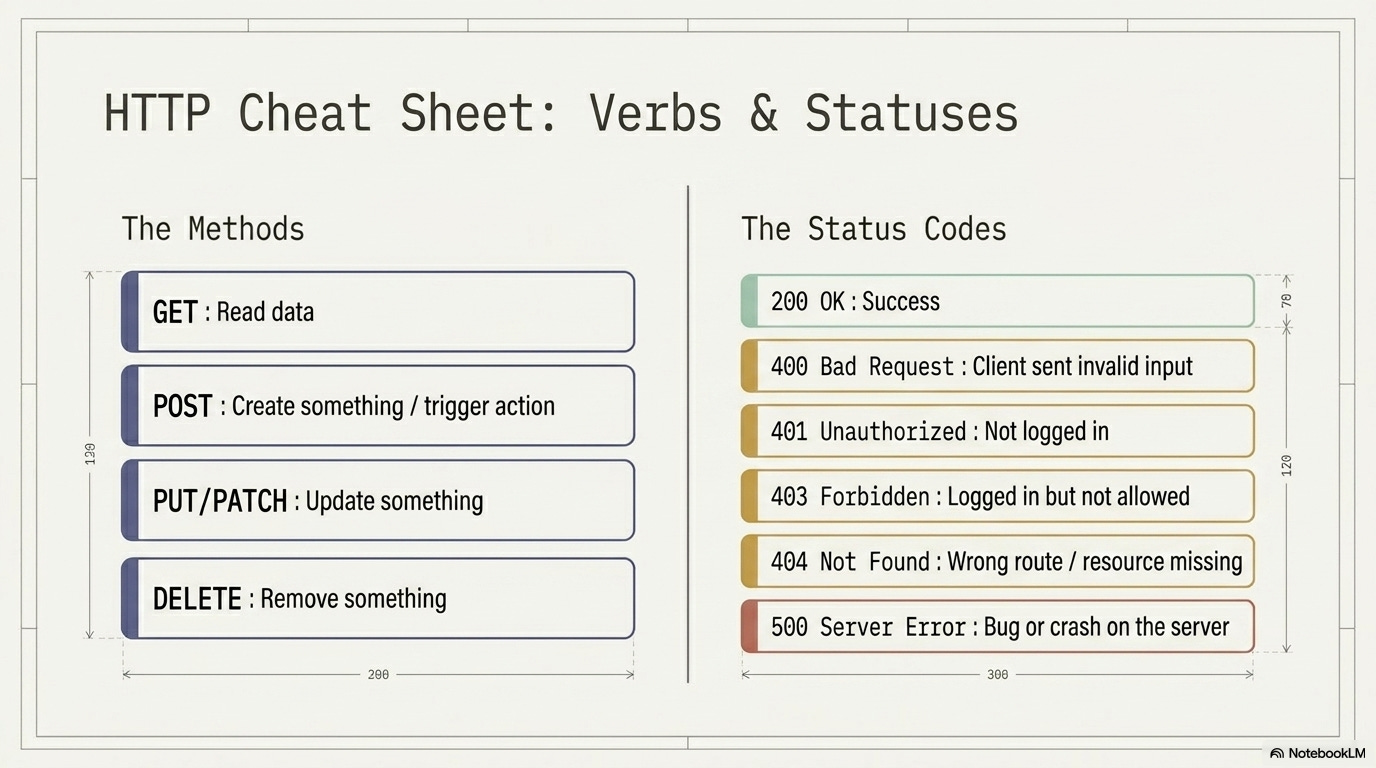
You can think of these as interaction verbs for the backend:
GET: read
POST: create / trigger
PATCH/PUT: update
DELETE: remove
Concrete example: When you delete a draft post, the app might call DELETE /api/posts/123.
🧾 Status codes (how the system tells you what happened)
200 OK: success
400 Bad Request: your input was invalid
401 Unauthorized: not logged in
403 Forbidden: logged in, but not allowed
404 Not Found: wrong URL / missing resource
500 Server Error: bug/crash on the server
Concrete example: You open a private course link without access → backend returns 403, and the UI shows “You don’t have access to this course.”
Designer translation: status codes are the backend’s “error states.” Your UI should map them to user-friendly messages.
🧰 Server request pipeline
✳️ Middleware
Plain English: “the bouncer / pre-flight checks before the endpoint.”
Middleware is code that runs before your endpoint handler (and sometimes after).
Typical middleware tasks:
Authentication checks: confirm who the request is from (logged in, valid session)
Authorization checks: confirm the requester is allowed to do this action
Input validation: reject malformed or unsafe inputs early
Logging: record what happened for debugging and audits
Rate limiting: cap request volume to prevent abuse and control cost
CORS handling: set “which websites are allowed to talk to us” rules, so your browser only accepts replies from the websites you trust. This is usually done by the server sending a header like
Access-Control-Allow-Origin(and sometimes allowing cookies too).
Concrete example: An auth middleware reads your session cookie, loads your user, and blocks the request with 401 if you’re not logged in—before the endpoint code runs.
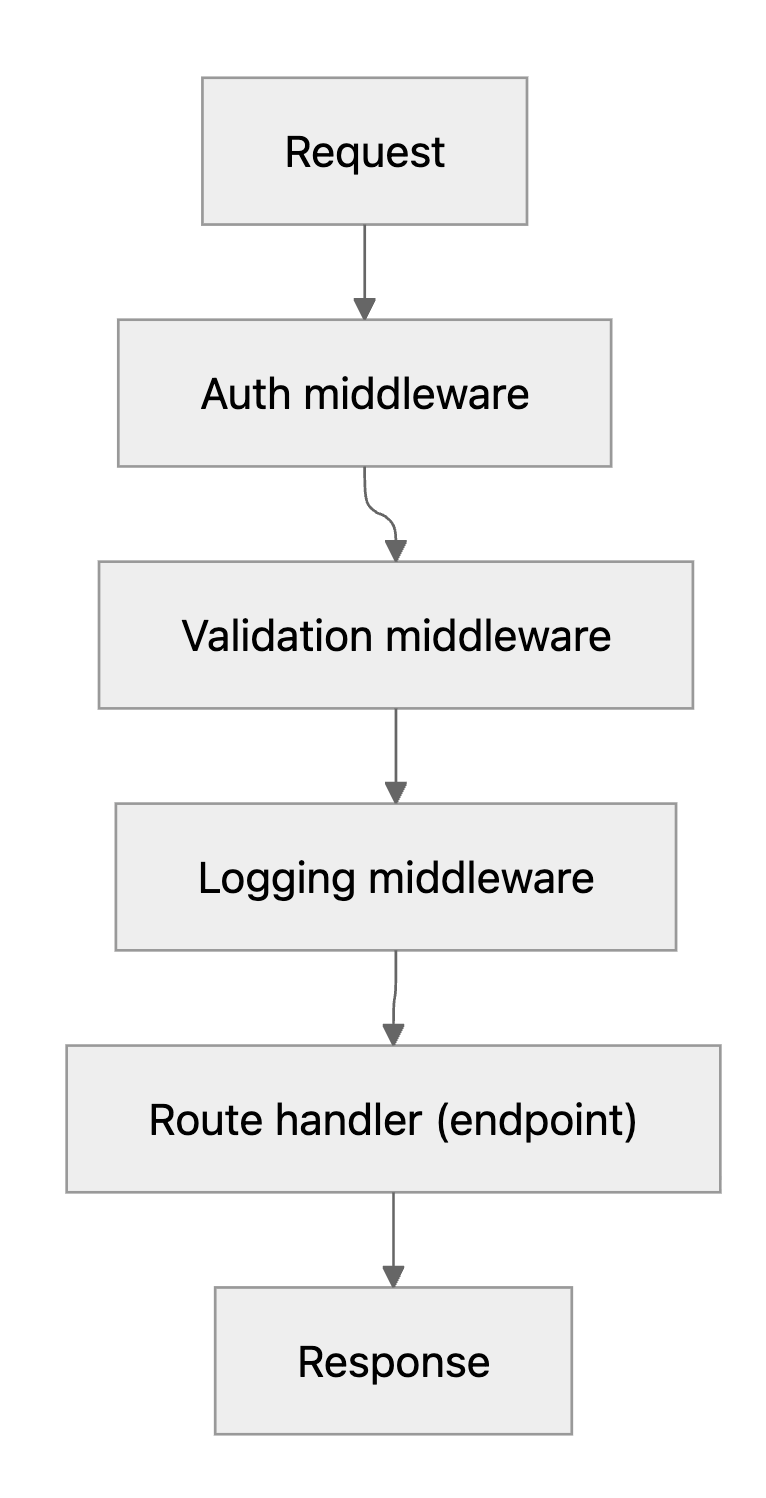
Mental model: Request → middleware stack → route handler → Response
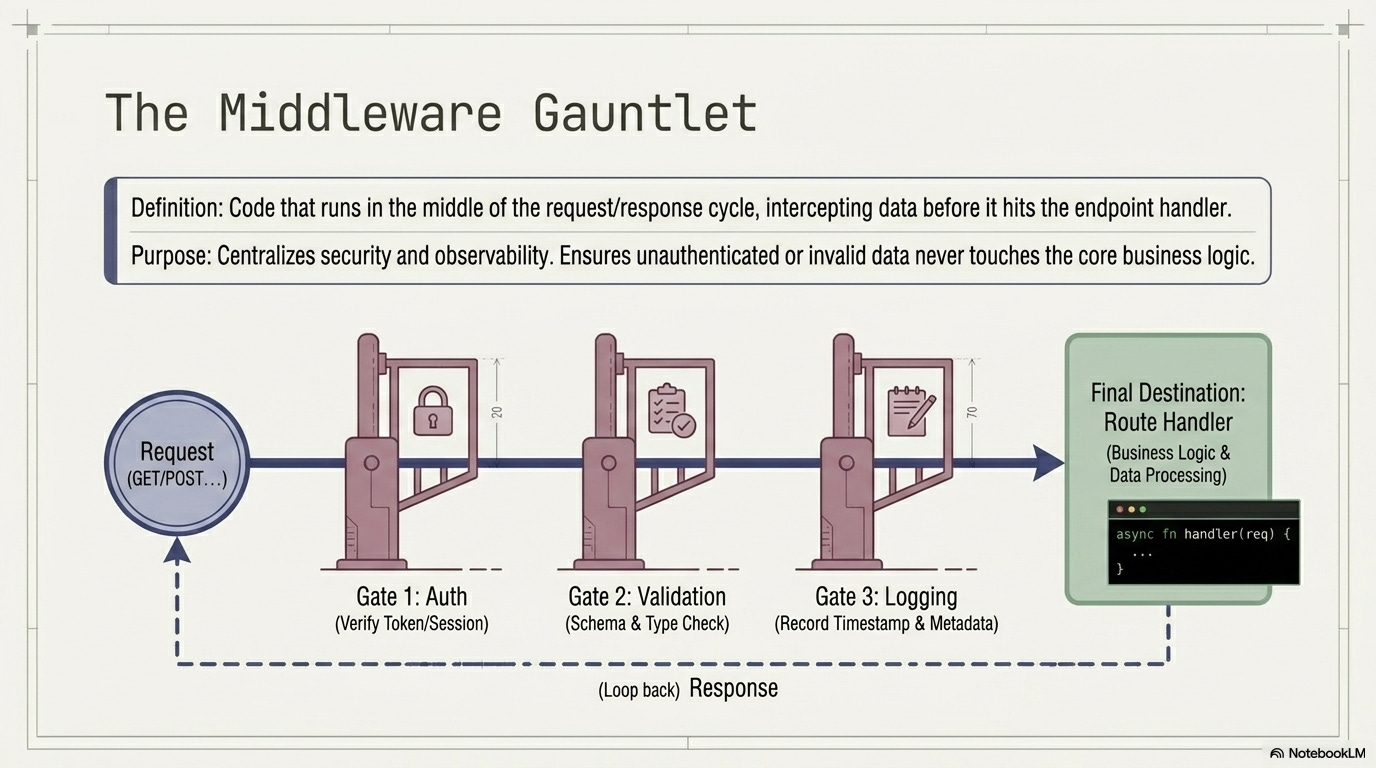
How middleware, server, and API endpoints relate
Server = the whole backend app running somewhere (it contains both middleware and endpoints).
Middleware = shared “checkpoint” code that runs on the server before/after an endpoint (auth, validation, logging, rate limits).
API endpoint = the specific handler that performs the “business action” (e.g. enroll, update profile).
Rule of thumb: middleware is the hallway, endpoints are the rooms, and the server is the building.
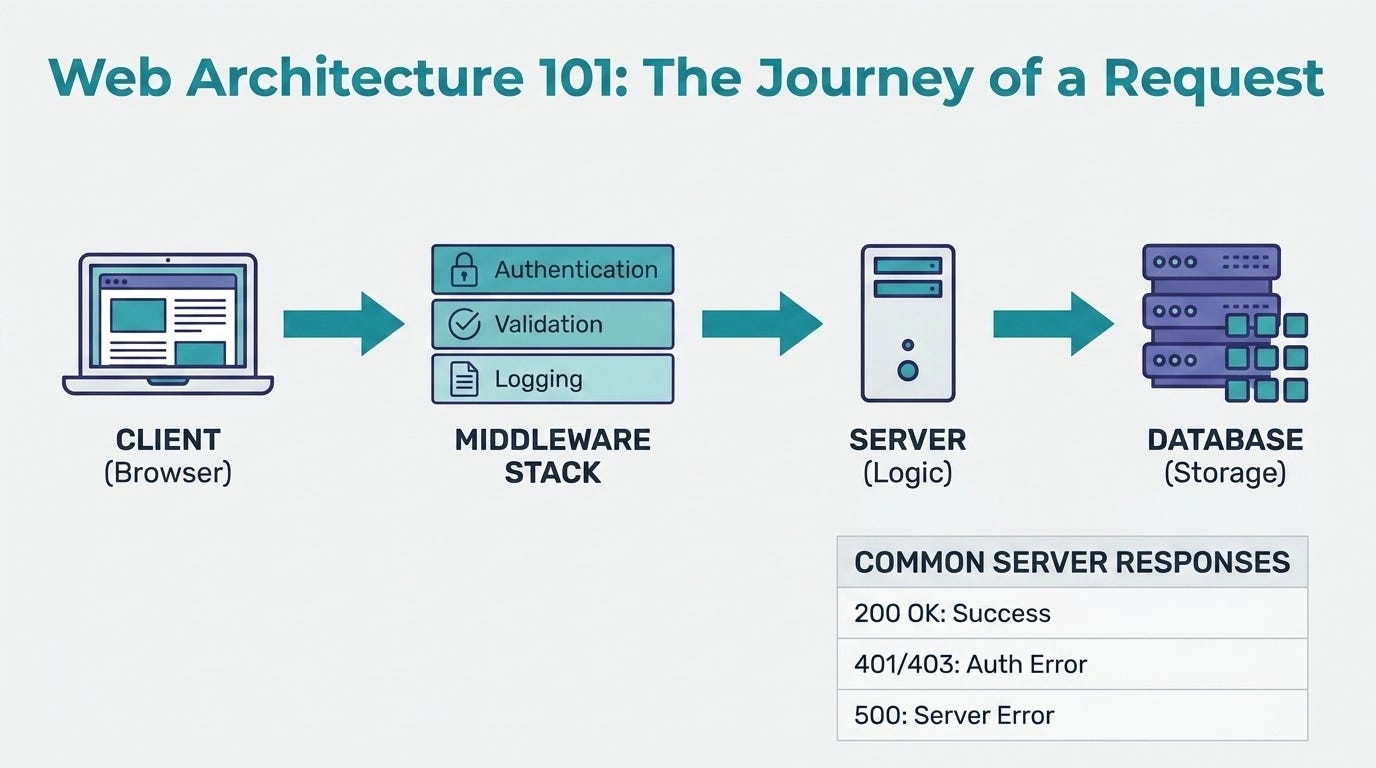
✳️ Diagram: endpoint + middleware stack
🗄️ Data & databases
✳️ Data modeling terms (zoom into the database)
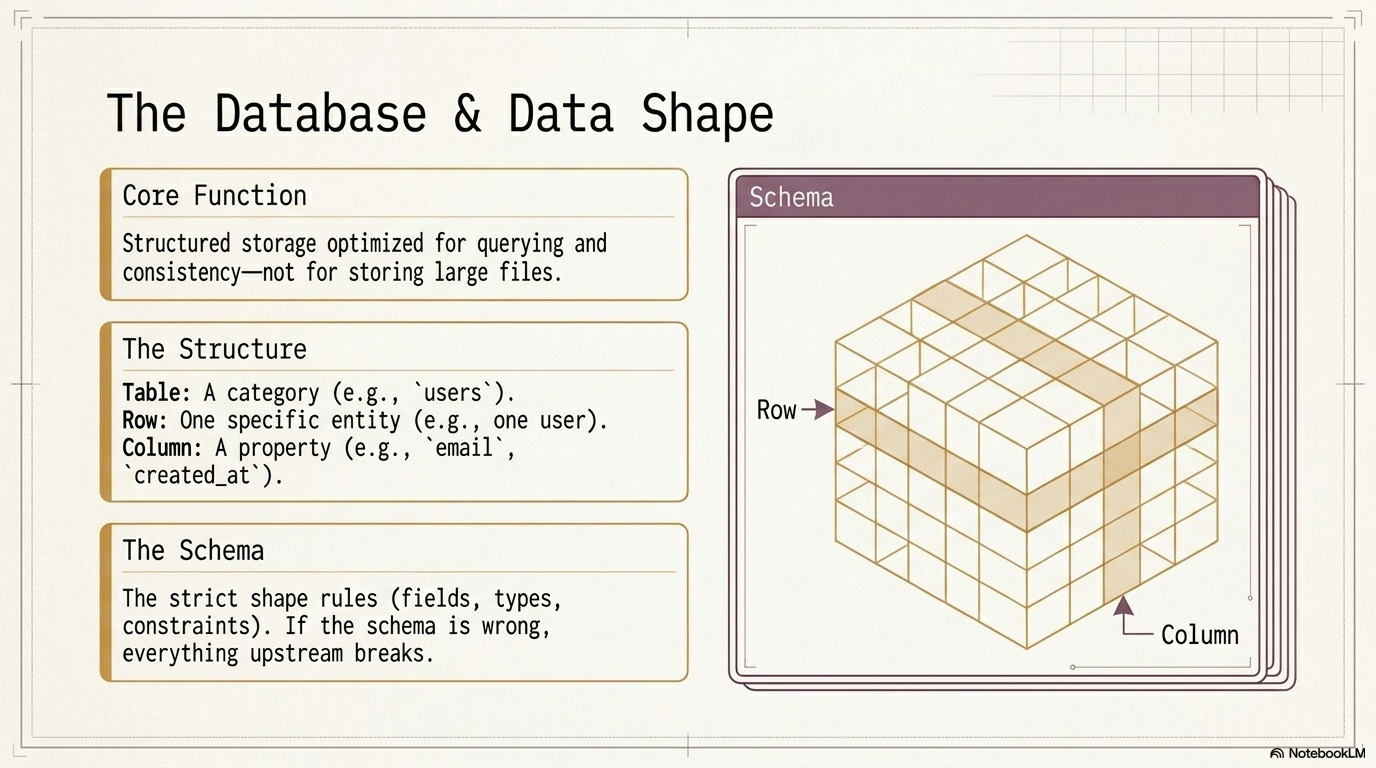
These are just ways to talk about structured data:
Table: a category of things (e.g.,
users)Row: one thing (one user)
Column: one attribute (email)
Concrete example: In users, one row might be { id: 42, email: "support@syllabind.com" }, and “email” is a column.
Designer translation: tables/rows/columns are the “components/instances/props” of data.
✳️ Schema
Plain English: “what fields exist, and what’s allowed.”
A schema defines the shape of data: field names, data types, constraints.
Good schema = easier features + fewer bugs
Bad schema = lots of edge cases + migrations later
Concrete example: The schema says email must be unique and created_at is required; if you try to create a user without created_at, the DB rejects it.
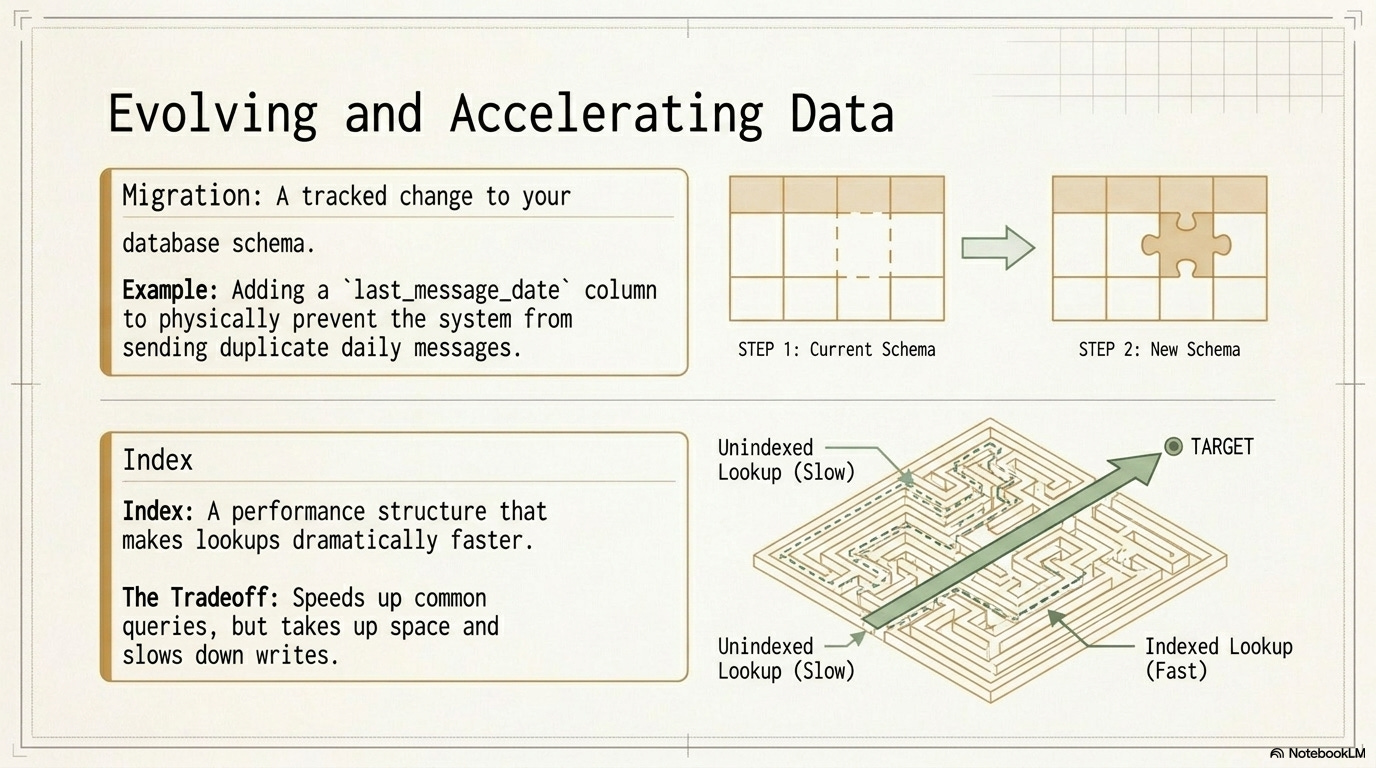
✳️ Migration
Plain English: “a planned change to the schema over time.”
A migration is a tracked change to the database structure.
Example: adding last_message_date so you don’t send duplicate daily messages.
Concrete example: You add a new plan column to users, backfill existing users to “free,” and deploy code that reads plan to gate premium features.
✳️ Index
Plain English: “a speed-up shortcut for lookups.”
An index makes common queries faster.
Tradeoff: takes storage and can slow down writes.
Concrete example: If you frequently look up users by email, an index on users.email makes “find by email” fast even with millions of users.
🔐 Identity & access (auth)
✳️ Auth: identity + permissions (two different questions)
These are often confused, so keep them separate:
Authentication (AuthN): “Who are you?”
Authorization (AuthZ): “What are you allowed to do?”
Concrete example: You log in with Google (AuthN). Then the app checks whether your account is on the “Pro” plan before showing export (AuthZ).
Designer translation: AuthN = login; AuthZ = roles, plans, entitlements.
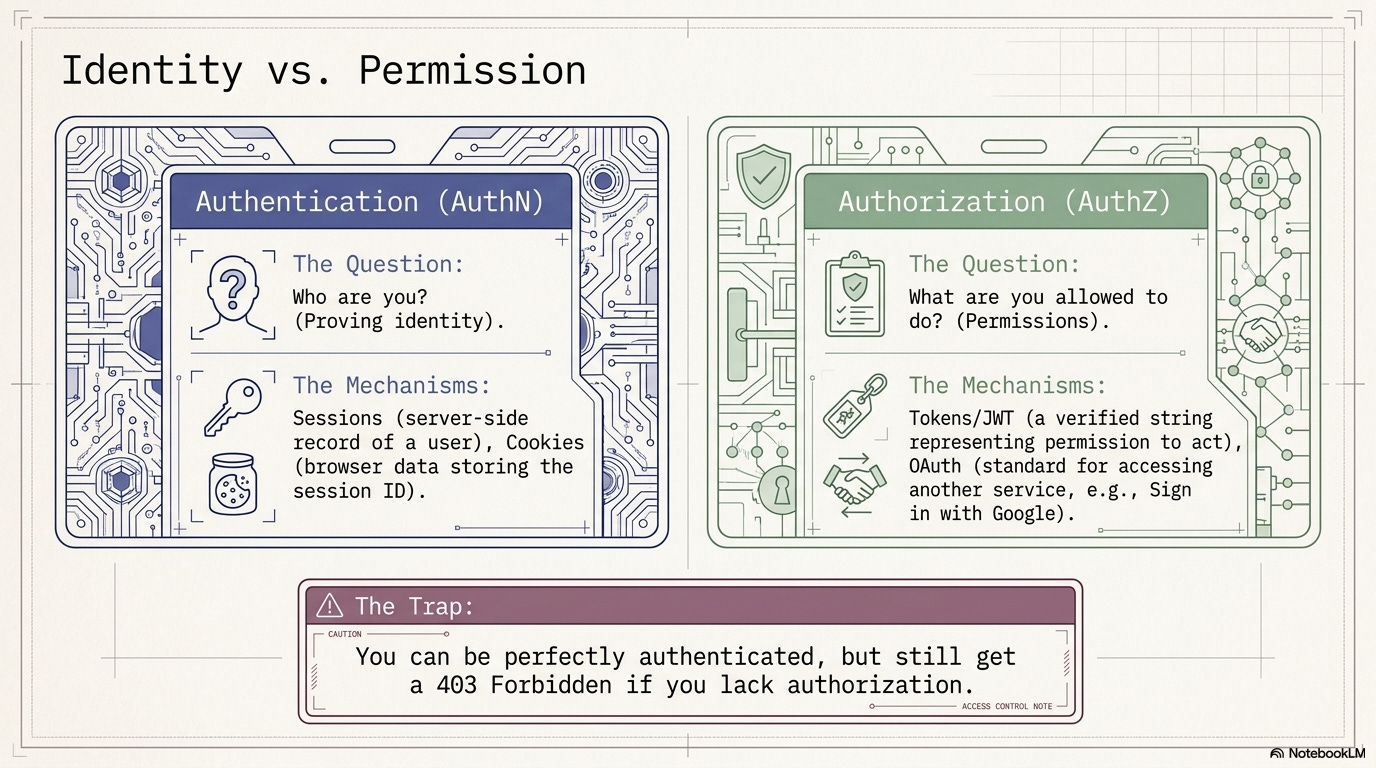
✳️ Session
Plain English: “a logged-in state the server remembers.”
A session is server-side memory of “this user is logged in.” The browser usually stores a session identifier.
Concrete example: After login, the server stores sessionId -> userId in Redis; your browser keeps sessionId in a cookie and sends it on every request.
✳️ Cookie
Plain English: “a small note the browser sends back each time.”
Cookies are small pieces of data stored in the browser and attached to requests.
Often used to store a session ID
Security flags matter:
HttpOnly,Secure,SameSite
Concrete example: Your browser sends Cookie: sessionId=abc123 with every request to syllabind.com, so the backend knows it’s you.
✳️ Token (JWT)
Plain English: “a portable pass.”
A token is a string that represents permission to act.
JWT is a common token format that can be verified (signed).
Tokens can be stored in cookies or other storage (tradeoffs).
Concrete example: A mobile app stores a JWT, then sends Authorization: Bearer <jwt>; the server verifies the signature and reads the user ID + expiration from the token.
✳️ OAuth
Plain English: “permission to use another service on someone’s behalf.”
OAuth is how “Sign in with Google” works. You get a limited-scope access token.
Concrete example: You connect Google Calendar; your app requests permission for “read events,” then uses the OAuth access token to fetch your upcoming meetings.
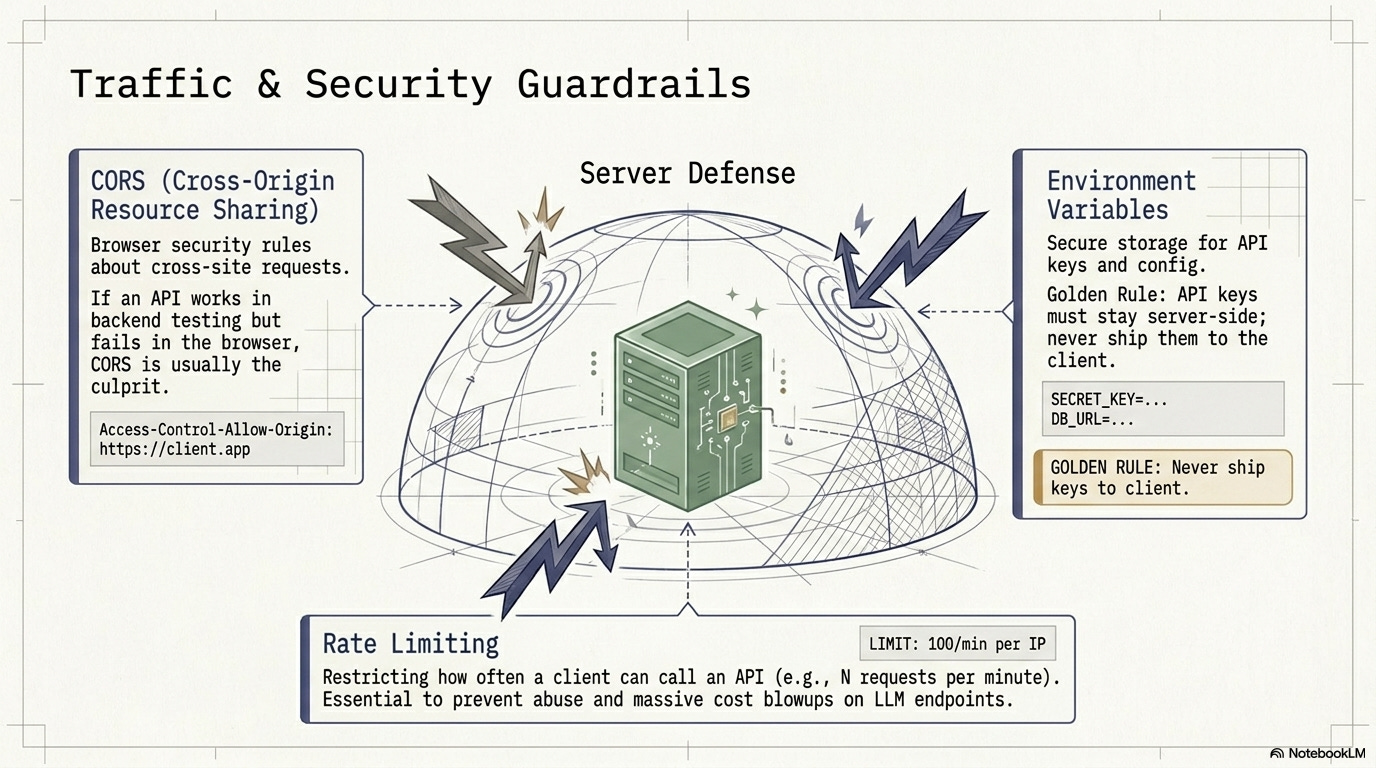
✳️ CORS
Plain English: “browser rules for cross-site calls.”
CORS is a browser security mechanism that controls whether a frontend on domain A can call a backend on domain B.
Symptom: “works in Postman / server-to-server, fails in the browser.”
Concrete example: Your frontend is on app.syllabind.com but API is api.syllabind.com; if the API doesn’t allow that origin, the browser blocks the response even though the server returned 200.
✳️ Environment variables (API keys)
Plain English: “secrets and configuration stored outside code.”
Environment variables store API keys and settings.
Keys should never be shipped to the frontend.
Put secret keys on the server only.
‼️ Don’t commit secrets to the cloud via CLI: avoid
git add .env/ committing API keys. Put.env(and similar secret files) in.gitignore, and use your hosting provider’s secret manager / env var settings (or a dedicated CLI likevercel env add,doppler secrets,aws ssm, etc.).
Concrete example: In production you set STRIPE_SECRET_KEY=sk_live_... on the server; the frontend never sees it, and only the backend uses it to call Stripe.
🛠️ Reliability & operations
✳️ Reliability + scaling terms
These concepts are about keeping the product healthy in the real world.
✳️ Rate limiting
Plain English: “don’t let one user spam the system.”
Rate limiting restricts request frequency to prevent abuse and cost blowups (especially for LLM calls).
Concrete example: The API allows 60 requests/minute per user; if you exceed it, you get 429 Too Many Requests and the UI asks you to slow down.
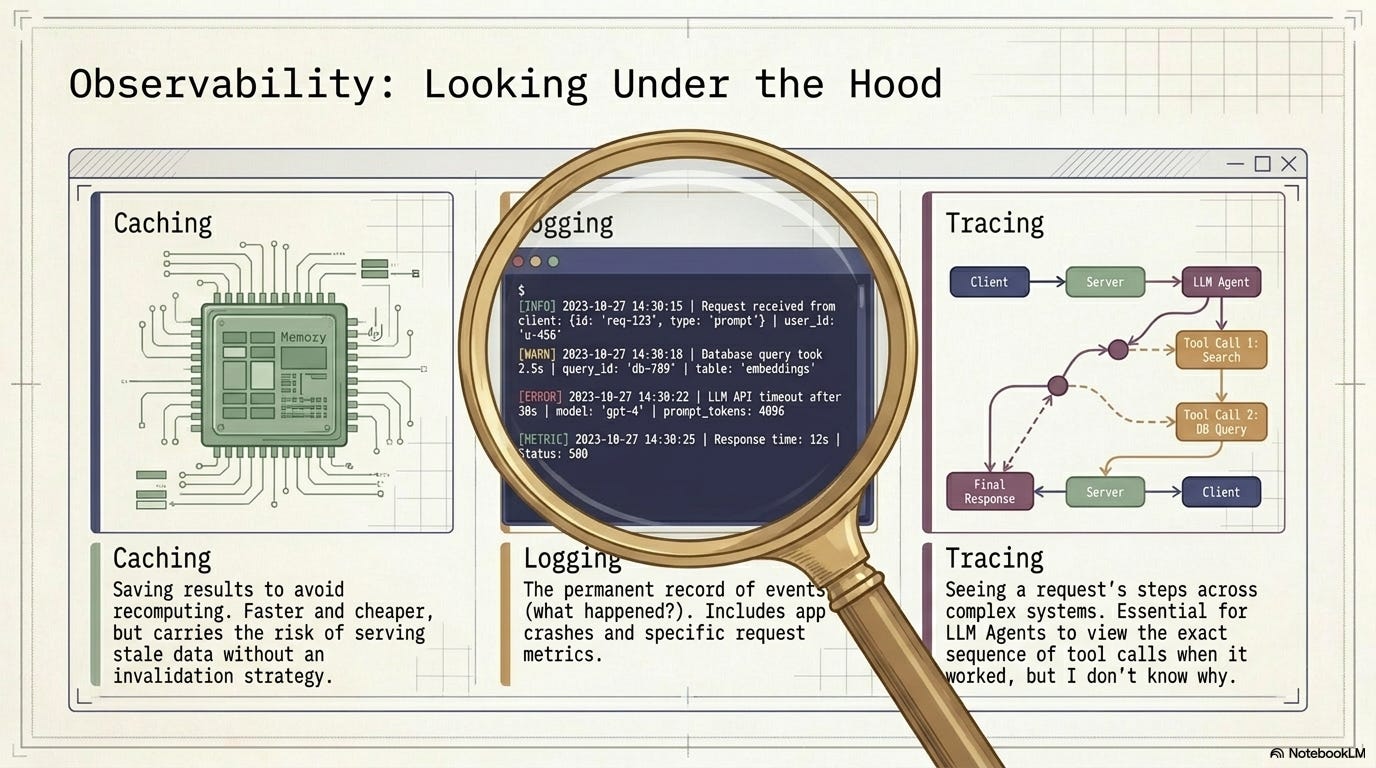
✳️ Caching
Plain English: “save the answer so you don’t redo work.”
Caching speeds up responses and reduces cost, but can serve stale data if you don’t invalidate correctly.
Concrete example: The backend caches “course catalog” for 5 minutes; most users get an instant response, but a newly published course might not appear until the cache expires (unless you actively bust it).
✳️ Logging
Plain English: “a timeline of what happened.”
Logging records events and errors so you can debug issues in production.
Concrete example: A log line like user=42 route=/api/enroll status=403 reason=course_closed helps you see why someone couldn’t enroll.
✳️ Tracing (observability)
Plain English: “follow one request through the system.”
Tracing helps you see the sequence of steps a request took—especially useful for LLM/agent systems where there are multiple tool calls.
Concrete example: You open a trace and see: API gateway → auth middleware → DB query (120ms) → Stripe call (800ms) → response; now you know latency is mostly Stripe.
🤖 LLM / agent systems
✳️ Prompt
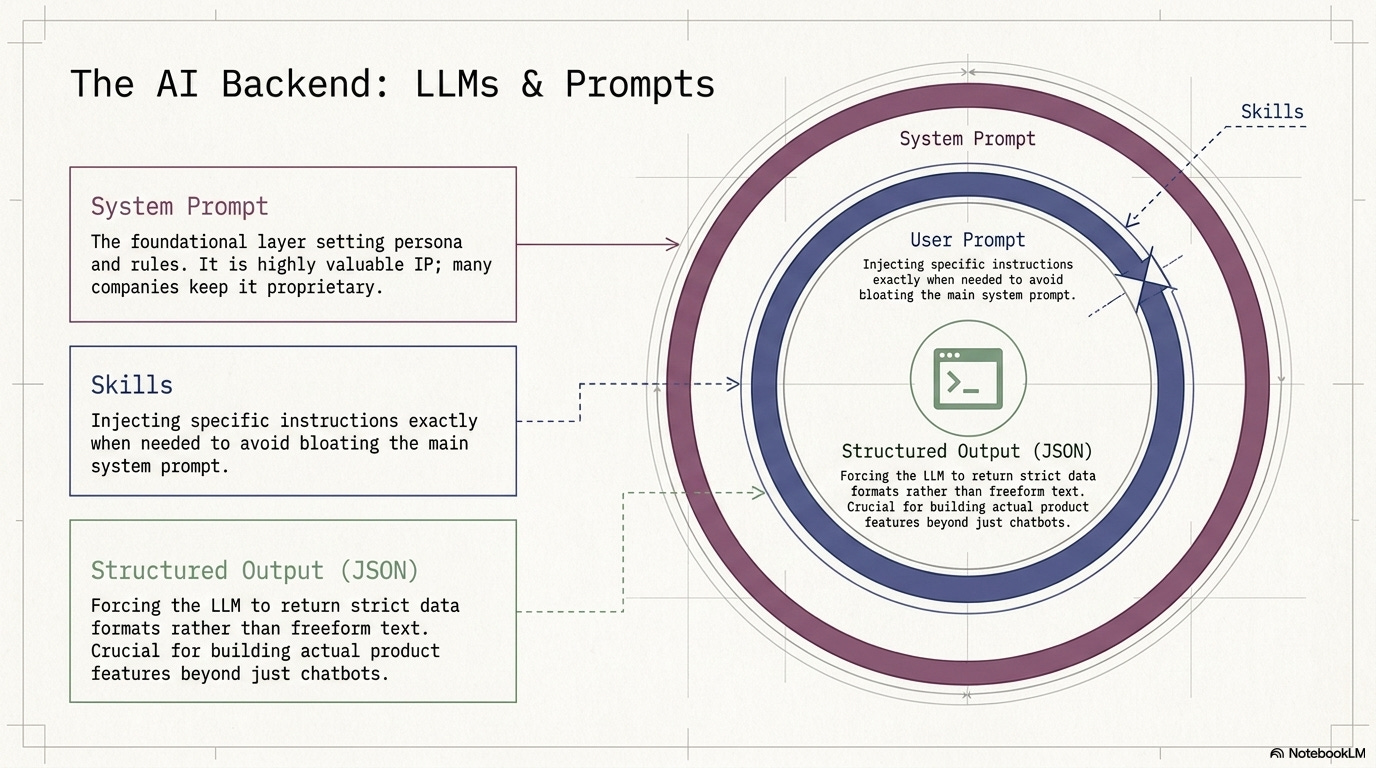
Plain English: “instructions + context for the model.”
A prompt usually includes: the task, constraints, context, and required output format.
Concrete example: “Summarize these notes in 5 bullets. Audience: product designer. Return JSON with keys {summary, risks}.”
✳️ System prompt
Plain English: “the permanent house rules.”
System prompts set persona + rules. Many companies treat them like valuable IP.
Concrete example: “You are a helpful support assistant. Never reveal secrets. If you’re unsure, ask a clarifying question.”
✳️ Structured output (JSON)
Plain English: “make the model return data, not vibes.”
Structured output asks the LLM to return strict JSON (or another schema), so your UI can reliably render/use it.
Concrete example: Instead of free text, the model returns { "intent": "refund_request", "confidence": 0.82 }, and your app routes the ticket automatically.
✳️ Agent (LLM sense)
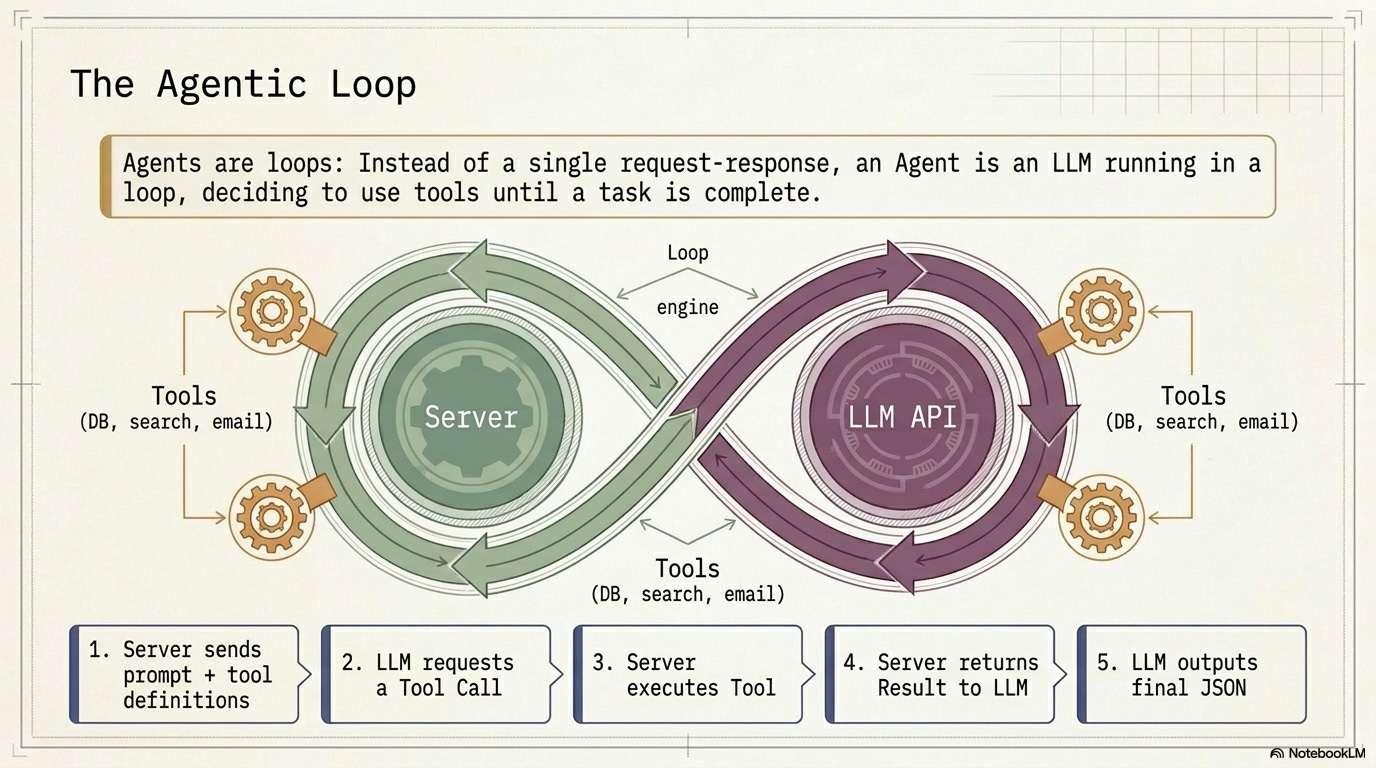
Plain English: “a model in a loop that can take actions.”
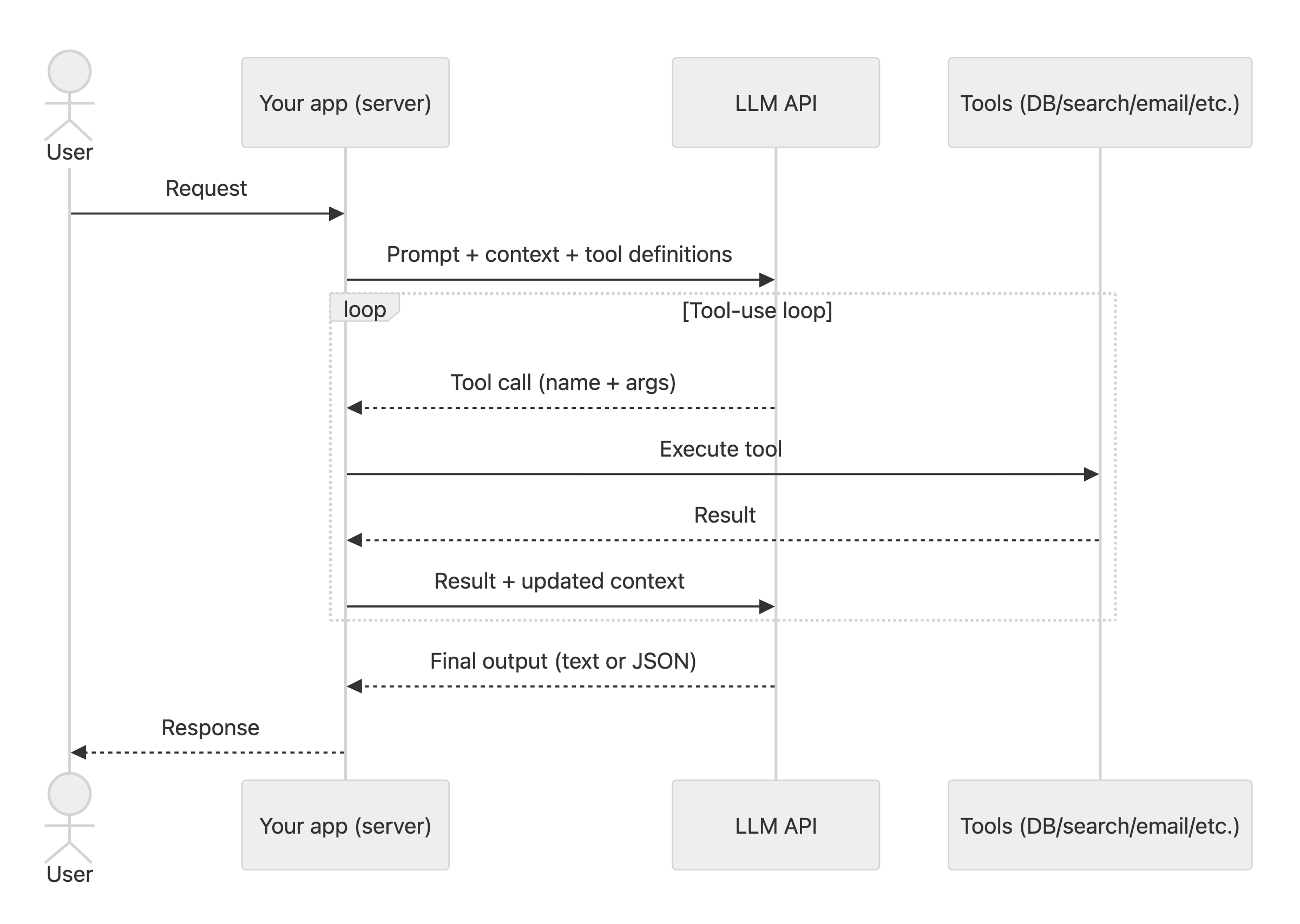
An agent is an LLM called repeatedly, with updated context, until the task is done.
Concrete example: A “research agent” searches docs, extracts citations, drafts an answer, realizes a gap, searches again, then finalizes.
✳️ Tool (for an agent)
Plain English: “a capability the model can ask the server to run.”
Tools are implemented on your server. The model chooses a tool, you execute it, and then you send the result back.
Concrete example: The agent calls a “searchDocs” tool to query your knowledge base, then calls a “createTicket” tool to open a support ticket.
✳️ Skills
Plain English: “just-in-time instructions.”
Skills are a way to load the right guidance at the right moment—without bloating the system prompt.
Concrete example: When the user asks “schedule a meeting,” the agent loads a “scheduling” skill that tells it to propose 3 time windows and confirm timezone before creating a calendar event.
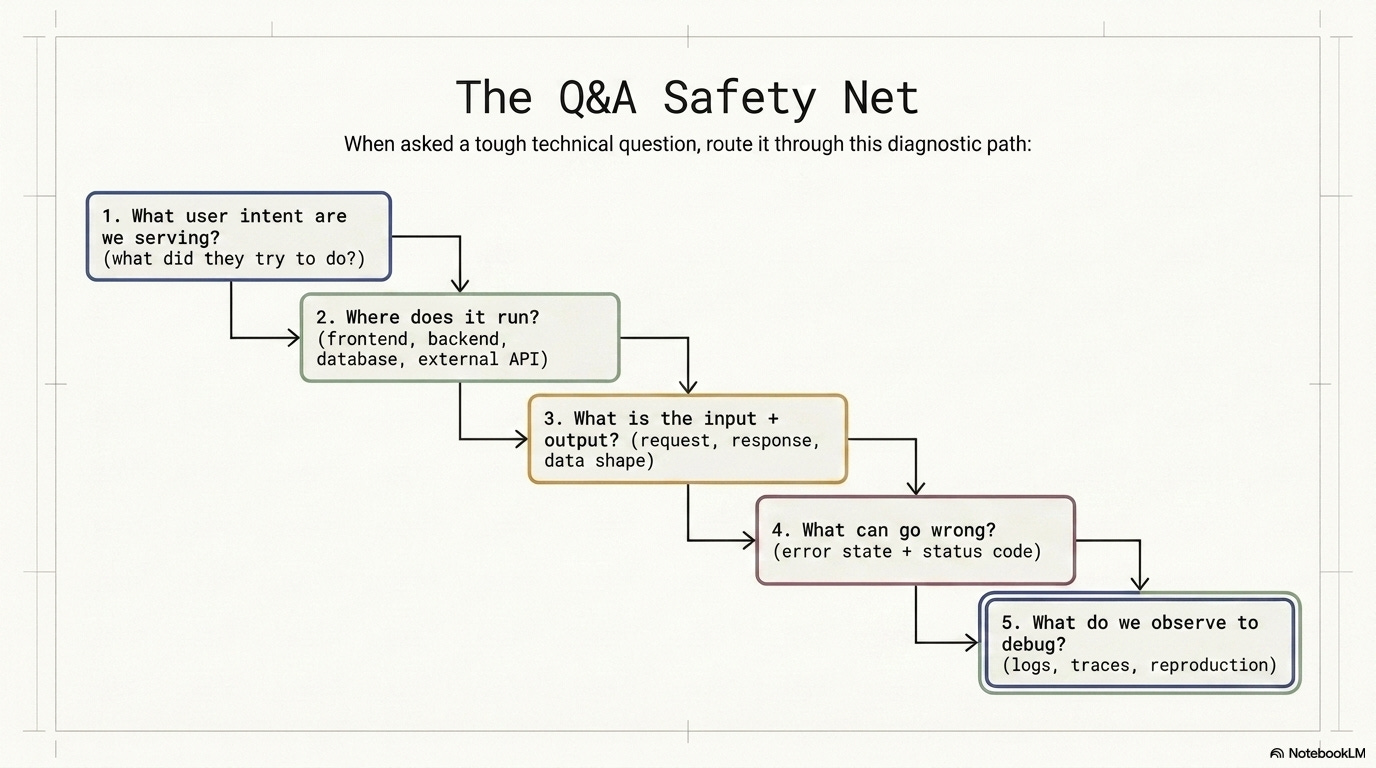
✅ The 5-question debugging sequence, starting with the user
When you get a hard question, pull the system back to this sequence:
What user intent are we serving? (what did they try to do?)
Where does it run? (frontend, backend, database, external API)
What is the input + output? (request, response, data shape)
What can go wrong? (error state + status code)
What do we observe to debug? (logs, traces, reproduction)
I hope you found this useful! Please like/subscribe/restack, or send this publication to a friend who might need it.